Free Substitute Lesson Plan Template for Teachers
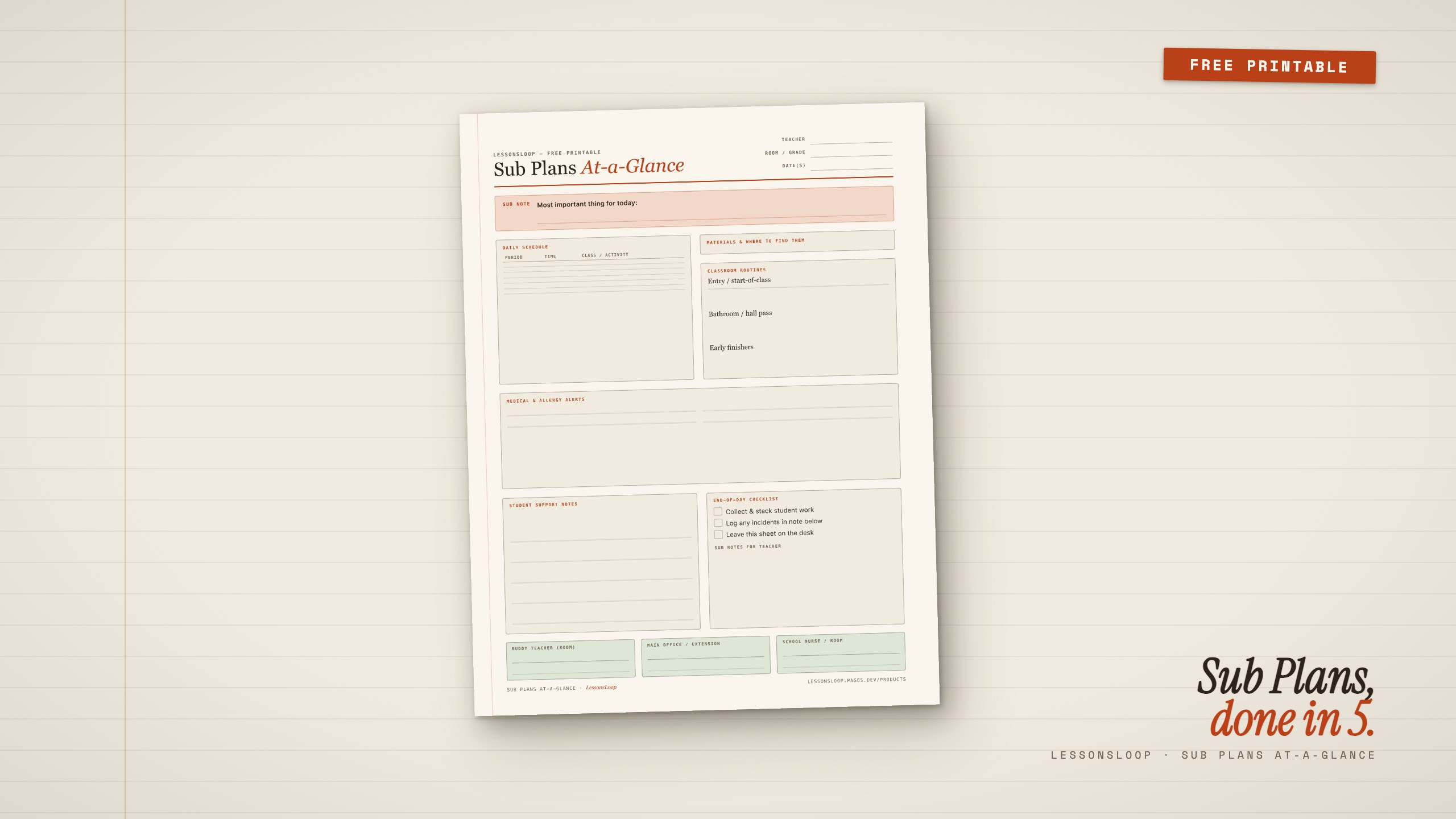
The direct answer: Download the free Sub Plans At-a-Glance one-pager below — it covers your daily schedule, classroom routines, materials location, medical alerts, key contacts, and an end-of-day checklist on a single US Letter sheet. Print it, fill it in, slide it into your sub binder, and update it at the start of each semester.
Download Free Sub Plans Template (PDF)No email required. Direct download.
Why most sub plan templates don’t work
The standard advice is to write detailed lesson plans for each possible absence day — essentially a parallel curriculum sitting in a binder on your desk. In theory, this is thorough. In practice, teachers rarely maintain it, and substitutes rarely follow multi-page documents with fidelity.
The underlying problem is format, not content. A three-page sub plan document fails because substitutes need information in the first 60 seconds of class — not after reading through two pages of instructional objectives. They need to know: where the materials are, which students have medical alerts, what to do when a student misbehaves, and who to call when something goes wrong.
That is four things. A single well-structured sheet covers all four better than a binder-length document does.
The 4 sections every substitute plan must have
Based on documented guidance from substitute coordinator training materials and reports from teacher communities about what actually helps substitutes manage classrooms effectively, four sections appear in every effective sub plan:
1. The daily schedule with class names and times. A substitute cannot improvise your period structure. They need periods, times, and class labels in a scannable table — not prose. The Sub Plans At-a-Glance printable has a seven-row schedule table that takes about 90 seconds to fill in.
2. Classroom routines for the three predictable pressure points. Entry procedure (how students come in and what they start doing), bathroom/hall pass policy (can students leave during class, and under what conditions), and early-finisher protocol (what students do when the assigned work is done). Substitutes without this information default to improvising — which is how classrooms go sideways.
3. Medical and allergy alerts, prominently placed. This is a legal and safety requirement, not an optional nice-to-have. Any student with a documented allergy, seizure history, medical device, or condition requiring emergency protocol needs to be on the sub plan. The printable has a clearly labeled section for this. Write it in ink, not pencil.
4. Three key contacts: buddy teacher, main office, school nurse. Not a phone tree — three people with room numbers and/or extensions. A substitute in a crisis does not have time to navigate a staff directory. Give them exactly three contacts and the specific scenarios for each.
How to use the Sub Plans At-a-Glance printable
The free download is a single US Letter page in landscape-friendly portrait format. Here is the recommended setup workflow:
Initial fill (15–20 minutes, once per semester): Fill in every static field — your name, room number, grade, daily period structure, class names, all classroom routines, medical/allergy alerts for current students on your roster, and the three key contacts. This is the one-time investment that makes every future absence cost zero additional prep time.
Before each absence (2–5 minutes): Fill in the date field, the “Most important thing for today” alert box at the top (this is where you put the lesson-specific instruction or the one non-negotiable thing the sub must do), and the materials location section. Update the class/activity column in the schedule table if today’s lessons differ from the standard description.
Print and place: Print one copy per absence day. Stack them on the left side of your desk with a sticky note that says “Substitute — read this first.” Do not bury the sheet under other materials. Some teachers laminate the static version and write the date-specific fields with a dry-erase marker — that works well for teachers with predictable routines.
The sub note field at the bottom: This is for the substitute to leave notes for you. Make sure the sub sees it — a brief verbal or written instruction (“please leave any notes in the bottom box before you leave”) dramatically increases the chance you get useful feedback.
Printable tip: The Sub Plans At-a-Glance is a free standalone. If you want a full classroom planning system — including a weekly lesson planner, unit planner, grading tracker, parent contact log, and the sub plans template with more fill space — the Sunday Planning Pack includes all 10 tools for $12.
The substitute binder approach vs. the single-sheet approach
The “sub binder” is a popular approach recommended in many teacher-resource communities: a dedicated binder containing classroom maps, seating charts, behavior management notes, pre-written lesson plans, and emergency contacts. For teachers in self-contained elementary classrooms, a binder is often the right call because a substitute is managing every subject all day.
For departmentalized middle and high school settings — where a substitute may see five to seven different classes in a day — the binder almost never gets read in full. At the secondary level, the single-sheet approach is better matched to how substitutes actually work. Each period is different; the substitute needs just enough to survive each one.
A practical middle ground: use the Sub Plans At-a-Glance sheet as the front page of a lightweight binder that includes (behind it) a seating chart and one page of lesson instructions per period. The sub plan sheet is always visible and always complete; the lesson detail is there if needed but doesn’t bury the critical information.
Keeping your sub plans current
The most common failure mode for sub plans is staleness. A sub plan written in September with six students’ medical alerts becomes dangerous if one of those students has a new diagnosis in January and the plan is never updated. Schedule a 10-minute sub-plan review at the start of each grading period — add it to whatever system you use to track quarterly admin tasks.
Two specific things to check every quarter:
- Medical/allergy section: verify against the current class roster and any updated health plan documentation from the school nurse
- Key contacts: verify room numbers and extensions for buddy teacher, office staff, and nurse — these change more often than you expect
Read next
For a systematic approach to weekly teacher prep beyond emergency planning, see the AI lesson planning workflow — it covers how to get a complete lesson plan draft in under 20 minutes. For a broader set of classroom planning tools, the Sunday Planning Pack includes the sub template alongside nine other pages built for the same streamlined-prep approach. Just need the spec sheet and download link? See the quick download page.
Common questions
Is the Sub Plans At-a-Glance template free with no strings attached?
Yes. Direct download from this page, no email required, no account, no trial period. The PDF is yours to print and use in your classroom.
Can I edit the PDF to add my school logo or change the layout?
The PDF is not editable directly, but the design is intentionally minimal so it works for any school. If you need a version with your school name or a modified layout, the easiest approach is to print it and add a school stamp, or contact us through the about page for a custom request.
What is the difference between this free template and the Sunday Planning Pack?
The free Sub Plans At-a-Glance is a single-page emergency sub sheet. The Sunday Planning Pack ($12) includes 10 pages: the weekly lesson planner (blank and filled example), daily lesson planner with timing table, unit planner, grading tracker for 25 students, parent contact log, the substitute plans template with more layout space, student feedback quick-slips (9 types), multi-period weekly planner, and a weekly teacher reflection sheet. The free download is a complete, useful tool — the paid pack is for teachers who want the whole system.
Should I leave the sub plan inside the substitute binder or on the desk?
On the desk, face up, on the left side. Do not bury it. Substitutes who cannot find your sub plan in the first 90 seconds of arrival will default to improvising, and the information on the sheet exists precisely to prevent that. A brief sticky note saying "Substitute — read this first" on top of the sheet dramatically reduces the chance it gets missed.